Telephone Scope of Appointment

Capture the authorization on the call. Keep the proof with the client.

Make the call inside Agent Workspace, follow your approved telephone SOA or voice authorization process, and keep the permitted recording beside the rest of the client file.

Calling is included with Essentials: $29.99/month after a 30-day free trial. Card required at checkout; one trial per NPN.

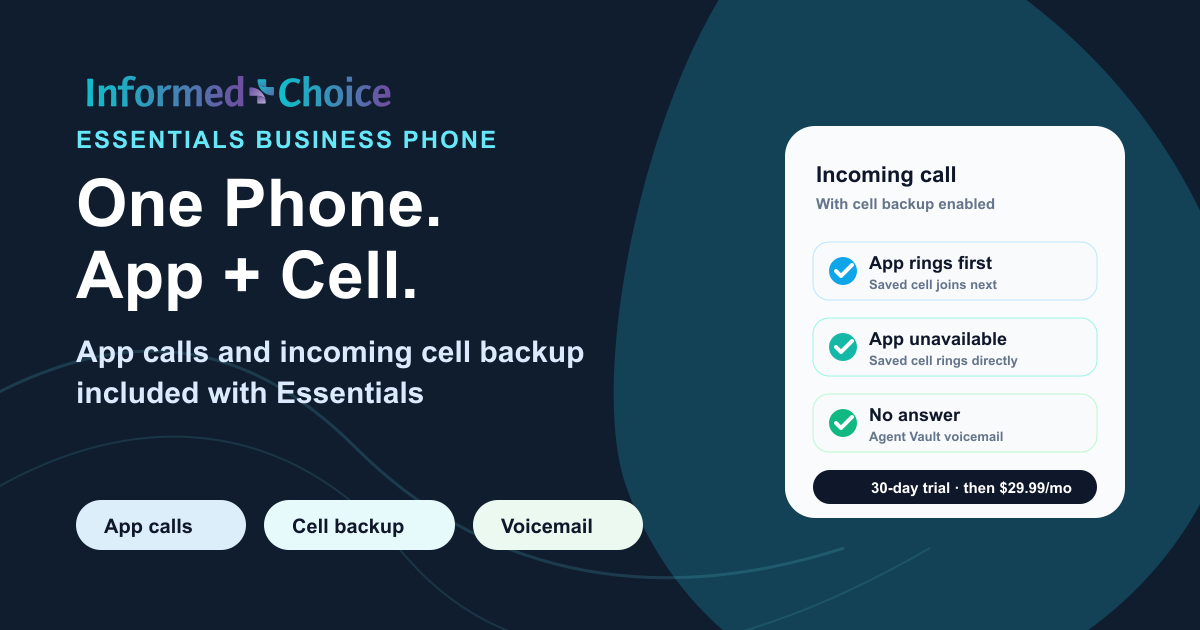
Essentials incoming call workflow: app ringing, included cell backup and voicemail
Inbound and outbound calls happen in the app through calling included with Essentials.
Telephone SOA Voice authorization Recorded in-app calling Exportable client records

The workflow

A telephone record without a second system

The phone is part of Agent Workspace, so the call can begin in the same place where the client and compliance records live.

01

Open the client and start the call

Activate your Essentials business number. Place outbound calls in the app and answer incoming calls in the app or through included cell backup. Ask support to assess an existing number before planning a transfer.

02

Follow your approved telephone process

Use the SOA, voice authorization, disclosure, or enrollment language required by your carrier, agency, FMO, state, and approved workflow.

03

Keep the proof with the client

Store the permitted recording beside the client record, electronic SOAs, plan documents, enrollment files, notes, and uploads for later retrieval or export.

Choose the record that fits

Telephone SOA does not replace electronic SOA

They are two ways to document the appointment scope. Use the method allowed by your approved process and most workable for the beneficiary.

Review electronic Scope of Appointment
Method Best fit Record kept
Electronic SOA The beneficiary can open a private text or email link and sign electronically. Signed form and completion history
Telephone SOA Your approved process allows the appointment scope to be documented on a recorded call. Call recording and related client file
Both when needed The call begins by phone, an electronic form follows, or the product scope changes. Connected call, form, and replacement records

What Agent Workspace supplies

The call and the record layer

  • Business number, app calling and included incoming cell forwarding
  • Permitted recording, call history, notes, voicemail, and playback
  • Connected SOAs, enrollment records, uploads, and client files
  • Long-term storage, retrieval, and export

What remains agent-controlled

The approved process around the call

Use the current scripts, notices, consent steps, disclosures, carrier language, agency procedures, state call-recording rules, and enrollment workflow that apply. Agent Workspace records the supported call and stores the proof; it does not decide which authorization language is valid for a particular transaction.

Retention

Do not treat every recording as the same record

6 years

Medicare marketing and sales calls

The CY2027 framework requires audio for years one through three, then audio or a complete and accurate transcript for years four through six.

Read the final rule

10 years

SOA and enrollment records

SOA, enrollment, and related records may follow separate 10-year requirements. Keep the recording and supporting file together for the period that applies.

See the agent compliance vault

This is workflow and recordkeeping information, not legal advice. Follow the current requirements and contracts that apply to the specific record.

Calling with Essentials

Business calling is included with Essentials

Start Essentials online for calling and connected client records. Ask our team about telephone setup or number porting.

Essentials with business calling

$29.99per month after trial

30-day free trial

A card is required at checkout. One 30-day free trial per NPN, then $29.99/month. Calling is included with Essentials.

Start your 30-day free trial Ask about Business Telephone

FAQ

Telephone SOA questions

Does a recording automatically create a signed SOA or a transcript?

No. Use your approved telephone script, obtain the required authorization and retain the recording. Link or upload that audio to the correct client or SOA record. This is an agent-led evidence workflow; Essentials does not automatically turn a conversation into a signed form or produce a transcript.

Can I use Essentials only as a phone service?

Use Essentials just for your phone, or use the rest of the workspace too. The price, signup and included phone features are the same.

Can incoming calls ring my cell phone?

With cell backup on, incoming calls ring in the app first and your saved cell joins after a few seconds. If the app is closed or unavailable, your cell rings directly. Answer the cell call and follow the keypad prompt to connect.

How many calling minutes are included?

Essentials is $29.99/month after a 30-day free trial. Card required at checkout; one trial per NPN. The trial includes 100 calling minutes; paid Essentials includes 1,500 calling minutes per month.

What happens when I miss a call?

If neither the app nor your cell answers, the caller can leave Agent Vault voicemail. With cell backup off, unanswered or closed-app calls go to voicemail. New calls also go to voicemail while your business line is busy.

How long does voicemail stay in the inbox?

Listen to voicemail in Agent Vault and receive a new-message email. Unsaved personal-line voicemail is kept for 30 days. Use Save to Vault to keep a message with your long-term records.

What is a telephone Scope of Appointment?

A telephone Scope of Appointment is a Medicare SOA workflow in which the appointment scope is documented by recorded call instead of a paper or electronic form, when that method is allowed by the approved process being used.

Can I use a recorded call for a telephone SOA?

CMS materials recognize telephonic recording as a method of delivery for telephonic appointments. Agents should use that method only when it fits the current carrier, agency, state, and enrollment procedures that govern the appointment.

Does Agent Workspace provide the telephone SOA script?

Agent Workspace provides the in-app business line, recording, client history, and vault workflow. It does not replace the approved scripts, notices, disclosures, carrier language, or enrollment procedures that apply to the call.

How do I get the recorded business line?

Essentials is $29.99/month after a 30-day free trial. Card required at checkout; one trial per NPN. The trial includes 100 calling minutes; paid Essentials includes 1,500 calling minutes per month.

Do telephone SOA calls happen inside the app?

Make outbound calls with your browser microphone and answer incoming calls in the app. Incoming cell forwarding is included with Essentials: turn on cell backup to ring your saved cell number too.

What happens when I cannot answer an inbound call?

If neither the app nor your cell answers, the caller can leave Agent Vault voicemail. With cell backup off, unanswered or closed-app calls go to voicemail. New calls also go to voicemail while your business line is busy.

Can I keep a voice authorization with an electronic SOA?

Yes. A supported call recording can be stored with related electronic SOAs, enrollment records, plan documents, uploads, and client notes so the file can be reviewed as a whole.

How long should I keep the recording?

Retention depends on the record. Under the CY2027 Medicare framework, marketing and sales call records have a six-year track, with audio required for years one through three. SOA, enrollment, and other records may follow separate 10-year requirements. Follow the current rules and contracts that apply to the specific file.

Can I export a telephone SOA recording?

Yes. Supported recordings and related documents are designed to be retrievable and exportable if your business, agency, FMO, CRM, or phone workflow changes.

Does this guarantee Medicare compliance?

No software can guarantee compliance by itself. Agent Workspace supplies calling, recording, storage, retrieval, and export workflows. The agent remains responsible for using the scripts, disclosures, consent procedures, state rules, and approved enrollment process that apply.
One connected record

Make the telephone authorization easier to find later.

Calling is available with Essentials at $29.99/month after a 30-day free trial. Card required at checkout; one trial per NPN.

Start your 30-day free trial

One phone product: Essentials

App calling and incoming cell forwarding, included.

Use Essentials just for your phone, or use the rest of the workspace too. The price, signup and included phone features are the same.

Essentials is $29.99/month after a 30-day free trial. Card required at checkout; one trial per NPN. The trial includes 100 calling minutes; paid Essentials includes 1,500 calling minutes per month.

Answer where you are

With cell backup on, incoming calls ring in the app first and your saved cell joins after a few seconds. If the app is closed or unavailable, your cell rings directly. Answer the cell call and follow the keypad prompt to connect.

If neither the app nor your cell answers, the caller can leave Agent Vault voicemail. With cell backup off, unanswered or closed-app calls go to voicemail. New calls also go to voicemail while your business line is busy.

Keep the message and the record

Listen to voicemail in Agent Vault and receive a new-message email. Unsaved personal-line voicemail is kept for 30 days. Use Save to Vault to keep a message with your long-term records.

Keep call history, permitted recordings and notes together. Link calls to the correct client, and review unmatched calls before filing them with an SOA or other records.

Start your 30-day free trial