Essentials by Informed + Choice

Medicare & ACA CRM Software for Agents

Keep client information, electronic forms, business calls, and annual review work together.

Essentials is your subscription to the connected Agent Workspace. Start with the task you need to do, then return to its status and records in Agent Vault.

$29.99/month after a 30-day free trial. Card required at checkout. One trial per NPN.

Compare offers and pricing
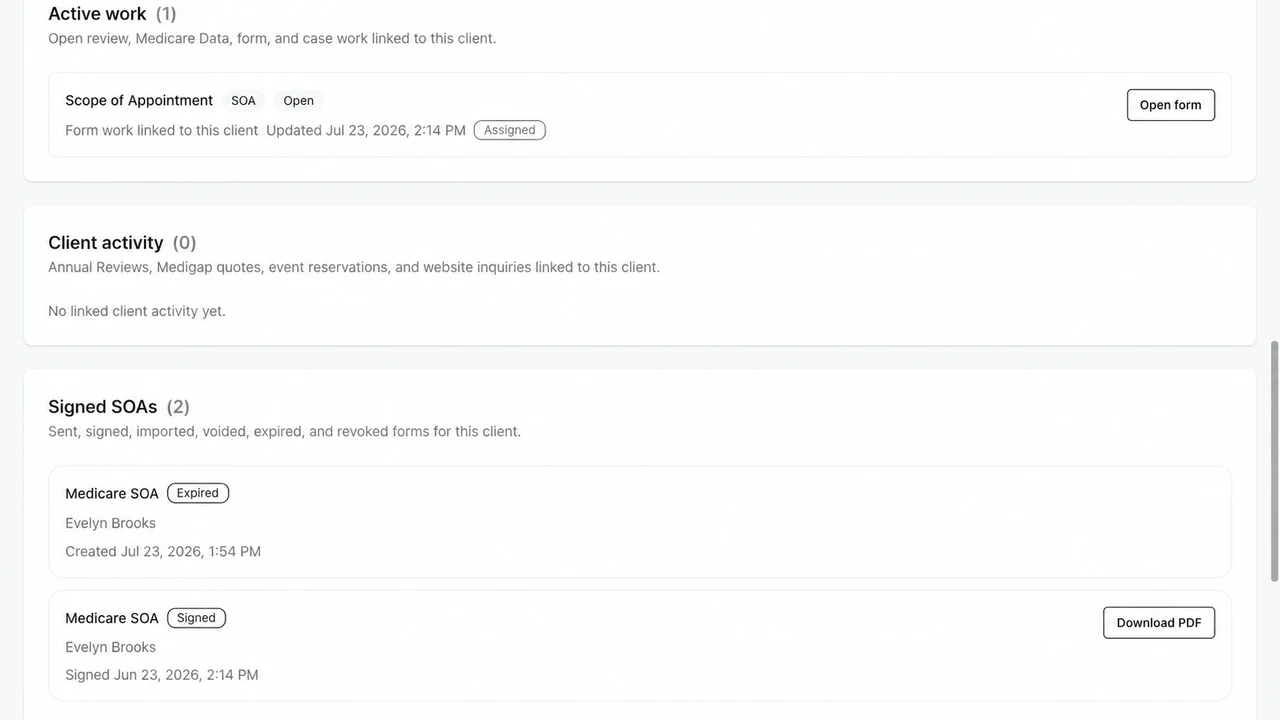
Example client record showing open SOA work, signed SOA history, and PDF retrieval
A product example with fictional client data: open work and completed SOAs in the client record. Select the image to inspect it.

A client task, from start to finish

Send an SOA. See its status. Retrieve the signed record.

Here is one workflow inside Essentials. These product screens use a fictional client, Evelyn Brooks, to show where the work and completed record appear.

  1. Send the SOA link

    Create a client-specific Scope of Appointment request and share its signing link by text or email. The client reviews and signs on their own device.

  2. Check what is still open

    Return to the client record to see the SOA work and its status. Check completion before moving to the next step in your appointment process.

  3. Open the signed record

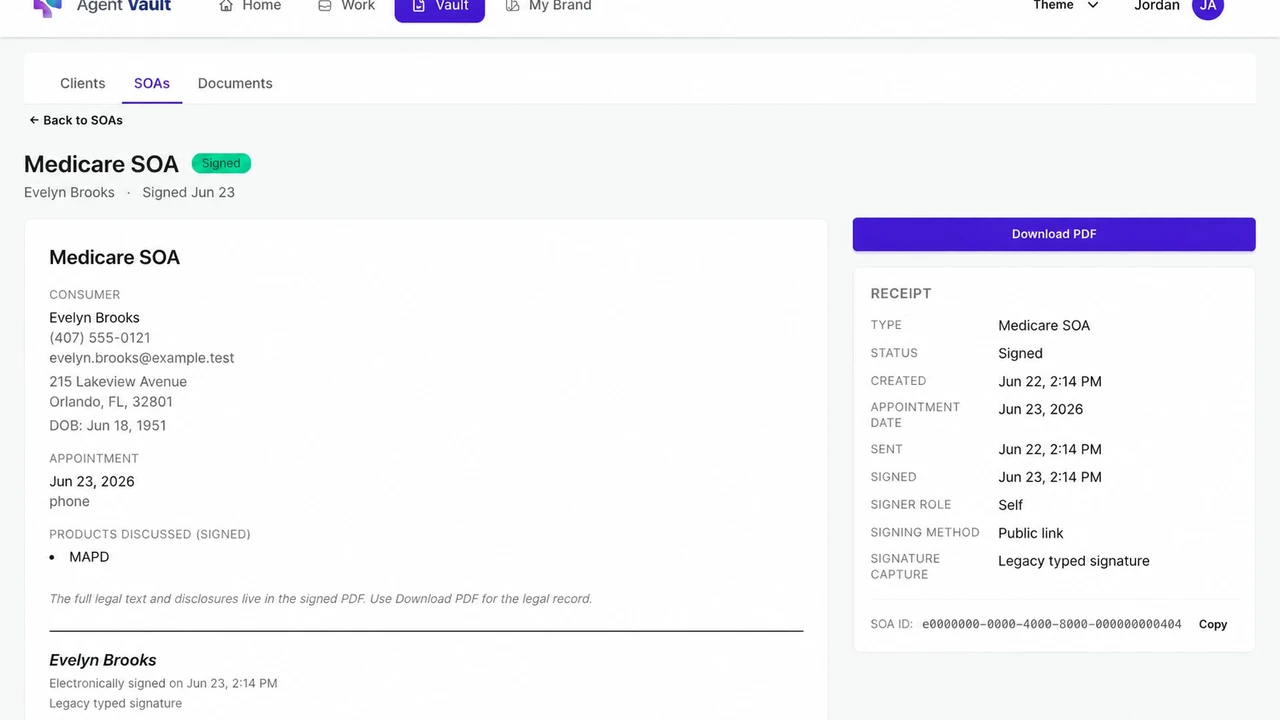
    Find the completed SOA, review its receipt, and download the PDF when you need the record.

Fictional client Evelyn Brooks: signed SOA receipt with appointment details, signing status, and a Download PDF button
The result: a signed SOA you can find again. The receipt shows its status and appointment details. Select the image to inspect the full-size example.

The signing workflow is also available in the focused Electronic SOA subscription. Essentials adds the broader client workspace.

See SOA tracking inside the client record

Purpose-built agent workflows

What you can do with Essentials

Keep client records, current work, and follow-up together. These tools support the work around that relationship; availability depends on the product, plan year, service area, and source data.

01

Prepare a Medicare review you can explain

Send one personal link. The client can connect available Medicare data, add prescription-bottle photos, or complete guided entry. Agent Workspace organizes medications, pharmacy, doctors, coverage, plan evidence, costs, and tradeoffs for the licensed agent to review. It does not choose a plan.

AI-assisted text extraction may help read a prescription bottle photo. Confirmed facts feed a rules-based assessment; the licensed agent reviews the evidence and makes the decision with the client.

Explore Medicare Annual Review

03

Give prospects a page and a next step

Publish or refresh a focused agent website and create educational event pages, printable flyers, QR codes, and RSVP workflows without buying separate website, design, and form products.

See website and event tools in the Workspace offer

04

Find the call and form when you need them

Make outbound calls in the app and answer incoming calls in the app or with included cell backup. Review permitted recordings, link calls to the correct client, and keep SOAs and supporting documents available for retrieval and export. Recording follows the applicable call policy, notice, and consent requirements.

Compare your options

Choose the offer that fits your work.

Essentials is the connected workspace. Electronic SOA is a focused subscription. Agency access starts with a conversation about your organization.

Essentials

$29.99/month

After a 30-day free trial. Card required at checkout. One trial per NPN. Monthly subscription.

Best fit
You want client records, forms, calling, and review work in one workspace.
What it covers
CRM, electronic SOA and ACA forms, business calling, Annual Review, quoting where available, an agent website, and event tools.
Getting started
Create an account, complete your agent profile, and enter payment details. Set up the features you plan to use.
Start your 30-day free trial Review Essentials inclusions

Electronic SOA

$9.99/month

30-day free trial if eligible, then $9.99/month. Card required. One trial per NPN for this plan.

Best fit
You need to send, track, and retrieve electronic Scopes of Appointment.
What it covers
A branded SOA page, personal or client-specific links, electronic signing, completion status, and record lookup and download.
Getting started
Create your account, confirm your trial eligibility and complete checkout, and set up the agent profile used on your SOA page.
Start Electronic SOA Review the focused SOA product

Agency access

Scoped with your team

Separate agreement and rollout. Pricing depends on your organization’s requirements.

Best fit
You need a consistent documentation process across agents or a downline.
What it covers
Discuss agent access, branded forms, records, reporting, support, and the workflow requirements of your rollout.
Getting started
Request a demonstration, review your requirements, and agree on an implementation plan with our team.
Request an agency demo Explore agency documentation workflows

Calling is part of Essentials: 100 calling minutes during the trial; 1,500 minutes per month on the paid plan. Use the phone on its own or with the rest of the workspace at the same subscription price. Review calling and setup details.

Before you start

Set up your account. Then try one useful task.

Have your login email, agent profile information, National Producer Number (NPN), and payment card ready. Registration takes you through Account, Profile, and Payment.

Essentials is $29.99/month after the 30-day free trial. One trial per NPN. Cancel before the first charge if you decide it is not a fit.

Ask about setup, billing, or cancellation
  1. 1. Create your account and agent profile

    Set up your login, provide your professional details, and continue to payment for the Essentials trial.

  2. 2. Choose the work you came to do

    For forms, set up your agent details and send an SOA link. For calling, activate your business number and allow microphone access in your browser. Ask support to confirm portability before planning to move an existing number.

  3. 3. Return to the result

    After a client signs, find the completed SOA and download its PDF. If you are evaluating calling, review a permitted recording and link the call to the correct client.

Agent Workspace FAQ

Clear answers before you start

What is the difference between Essentials, Agent Workspace, and Agent Vault?

Essentials is your subscription to Informed + Choice Agent Workspace. Agent Vault is the app name you will see during registration and in the client-record and document tools. These are parts of the same Essentials experience, not separate purchases.

What happens when the trial ends?

After the 30-day free trial, Essentials is $29.99/month and renews monthly until you cancel. A card is required at checkout and there is one trial per NPN. Cancel before the first charge if you do not want to continue. Contact support for help with billing or cancellation.

How many calling minutes are included?

Essentials is $29.99/month after a 30-day free trial. Card required at checkout; one trial per NPN. The trial includes 100 calling minutes; paid Essentials includes 1,500 calling minutes per month.

Can I retrieve my records if my needs change?

Completed SOAs have a PDF download, and document and recording workflows support retrieval and export. Access after cancellation follows your subscription terms; storage duration alone does not guarantee ongoing account access.

How is Agent Workspace different from a generic insurance CRM?

A generic CRM generally manages contacts, leads, tasks, notes, and follow-up. Agent Workspace adds the Medicare and ACA workflows around that relationship: Annual Review, quoting, recorded business calls, electronic SOA and ACA consent, an agent website, educational event pages, and searchable long-term records.

How do I get access to Essentials?

Start Essentials online for $29.99/month after a 30-day free trial. Create your account, complete your profile, and continue to payment. Card required at checkout. One trial per NPN.

Can I keep my current phone number?

Ask support to review your existing number and the requirements before planning a transfer. Number portability and timing must be confirmed; there is no self-service porting checkout.

Does Agent Workspace include Medicare and ACA quoting?

Agent Workspace includes Medicare Advantage, including Medicare Advantage Prescription Drug (MAPD), standalone Part D, Medicare Supplement, and ACA Marketplace quoting workflows where available. Availability varies by product, state, service area, plan year, and available source data.

Can I create an agent website and educational event pages?

Yes. Agent Workspace includes a focused agent website and tools for creating educational event pages, printable flyers, QR codes, and RSVP workflows.

Does the Medicare Annual Review choose a plan?

No. Annual Review applies defined calculation and requirement-matching rules and organizes the available evidence. The licensed agent reviews the information, explains the tradeoffs, and makes the plan decision with the client.

Can I buy Electronic SOA without Essentials?

Yes. Electronic SOA is a focused subscription with its own signup. 30-day free trial if eligible, then $9.99/month. Card required. One trial per NPN for this plan.

Can an agency or FMO use Agent Workspace?

Yes. Agency implementations use a separate pricing and rollout process because provisioning, branding, hierarchy, reporting, support, and workflow requirements vary.

Does Agent Workspace replace carrier, FMO, or enrollment platforms?

No. Continue using carrier, FMO, and approved enrollment platforms where required. Agent Workspace keeps the client record, supporting work, calls, forms, evidence, and follow-up connected around those systems.

One system for the client relationship

Start with a task. Come back to its result.

Try the client record, send an SOA, or set up your business line. Essentials is $29.99/month after a 30-day free trial.

Start your 30-day free trial

Card required at checkout. One trial per NPN. Monthly subscription.

Built for licensed agents using the notices, scripts, disclosures, carrier procedures, state rules, and approved enrollment workflows that apply to their business.